An Aselfon M8 system consists of the M8 main board, placed near the elevator control panel, and intercom units installed inside the car, on the car roof and in the pit. The main board is powered from the panel and a 12 V battery; the intercom units connect to the board over a two-wire A-B line. Call numbers are set by calling the device and entering commands on the phone keypad. This page is the text version of the wiring diagram that comes in the box.
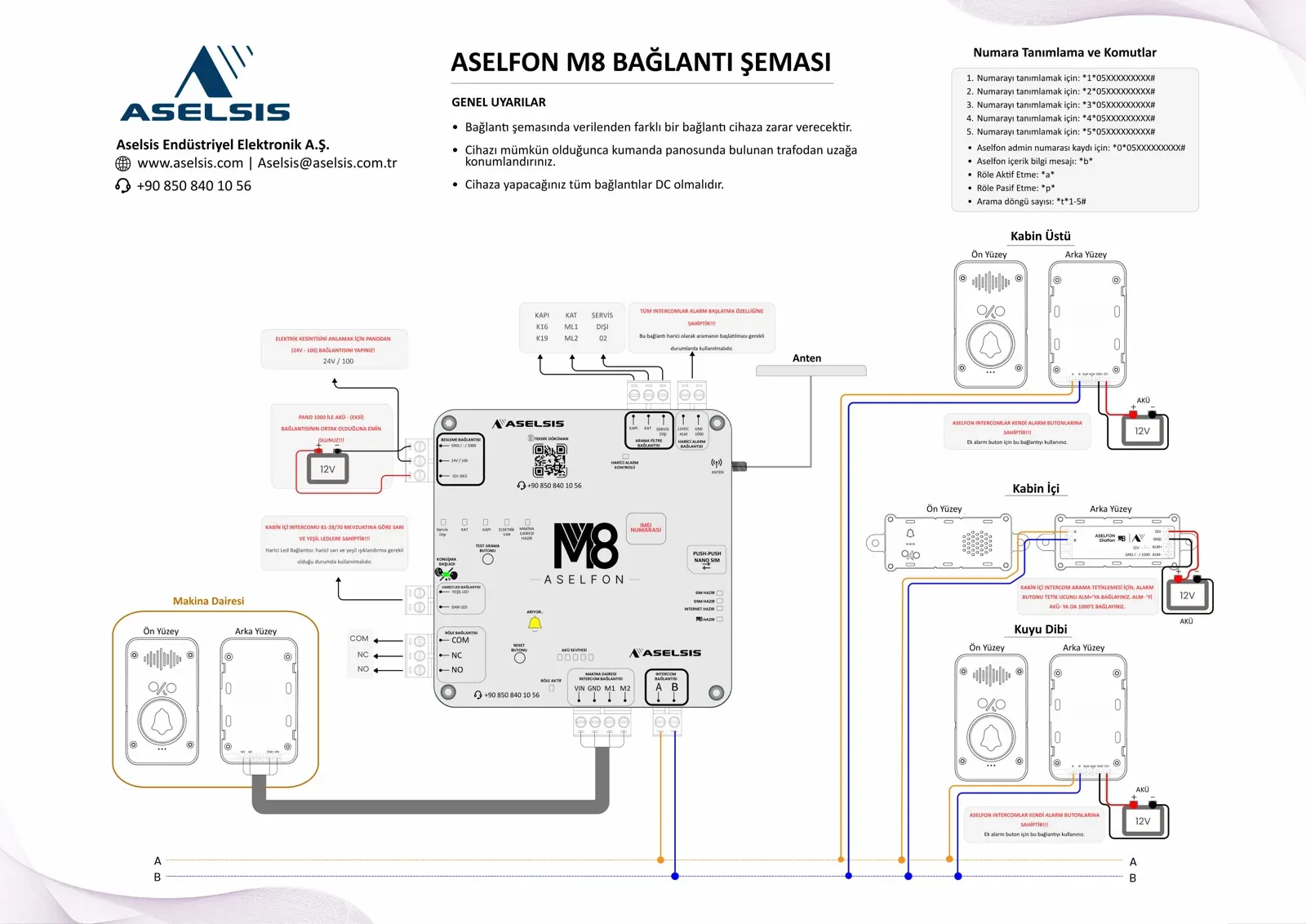
Before you start: general warnings
- Any connection other than the one shown in the wiring diagram will damage the device.
- Place the device as far as possible from the transformer in the control panel.
- All connections to the device must be DC.
Aselfon M8 runs on a 12–24 V DC supply. It is rated IP54 and designed to operate between -20 °C and +60 °C. The order below can be followed during installation; each section covers one terminal group on the diagram. Terminal and indicator names are printed in Turkish on the board and are kept as they are here.
System components
| Part | Where it goes | Included in |
|---|---|---|
| Aselfon M8 A board (main board) | Near the control panel | M8 and M8 Plus |
| B intercom (2 pcs) | Car roof and pit | M8 and M8 Plus |
| C intercom | Inside the car | M8 and M8 Plus |
| Machine room intercom (orange) | Machine room | M8 Plus only |
| Antenna | Antenna input on the main board | M8 and M8 Plus |
| Terminal blocks, wiring diagram, in-car warning label | — | M8 and M8 Plus |
Every intercom unit has its own alarm button. The 12 V battery shown on the diagram is not part of the box contents.
Main board terminals at a glance
Each terminal group is labelled on the main board. For quick reference, here they are together:
| Terminal group | Terminals | Connects to |
|---|---|---|
| Power (BESLEME) | GND / - / 1000 · 24V / 100 · 12V AKÜ | Battery and control panel |
| Intercom (INTERCOM) | A · B | A and B terminals of every intercom unit |
| Machine room intercom | VIN · GND · M1 · M2 | Machine room intercom (M8 Plus) |
| Call filter (ARAMA FİLTRE) | KAPI · KAT · SERVİS DIŞI | Door, floor and out-of-service signals on the panel |
| External alarm (HARİCİ ALARM) | 12VDC ALM · GND 1000 | External source that starts a call (if needed) |
| External LED (HARİCİ LED) | YEŞİL LED · SARI LED | External yellow and green lights (if needed) |
| Relay (RÖLE) | COM · NC · NO | Relay output |
| Antenna | — | The antenna in the box |
1. Power and battery
Connect the battery negative (-) to the GND / - / 1000 terminal and the battery positive (+) to the 12V AKÜ terminal of the power block, then bring the 24V - 100 line from the control panel to the 24V / 100 terminal.
| Terminal | Connection |
|---|---|
| GND / - / 1000 | Battery negative (-); common with the 1000 line in the panel |
| 24V / 100 | The 24V - 100 line in the control panel |
| 12V AKÜ | Positive (+) of the 12 V battery |
- Always make the 24V - 100 connection from the panel, so that power cuts can be detected.
- Make sure the panel's 1000 line and the battery negative (-) are common.
2. Intercom line: A and B
Connect the A and B terminals of the main board's intercom block to the A and B terminals of the in-car, car-roof and pit intercoms; all units sit in parallel on the same two-wire line.
A always goes to A and B to B. The 12V terminal of each intercom unit goes to the battery positive (+) and its GND terminal to the negative (-).
| Intercom | Location | Terminals on the back |
|---|---|---|
| B intercom | Car roof | A · B · ALM · ALM · GND · 12V |
| B intercom | Pit | A · B · ALM · ALM · GND · 12V |
| C intercom | Inside the car | A · B · 12V · GND · ALM+ · ALM- |
3. Car alarm button and extra alarm buttons
So that the alarm button inside the car can start a call, connect the button's trigger lead to ALM+ on the in-car intercom, and ALM- to the battery negative (-) or the 1000 line.
The car-roof and pit intercoms already have an alarm button. If an extra alarm button is needed at those points, use the ALM terminals of the intercom unit.
4. Machine room intercom (M8 Plus)
Connect the VIN, GND, M1 and M2 terminals on the back of the orange machine room intercom in the M8 Plus package to the terminals with the same names on the main board's machine room intercom block.
With this intercom, the technician in the machine room talks directly to the car, the car roof and the pit. The MAKİNA DAİRESİ HAZIR (machine room ready) indicator on the main board shows the status of this connection.
5. Call filter inputs: door, floor, out of service
Connect the KAPI (door), KAT (floor) and SERVİS DIŞI (out of service) inputs of the main board's call filter block to the corresponding signals in the control panel.
| Board input | Panel signal | Panel terminal on the diagram |
|---|---|---|
| KAPI | Door | K16 · K19 |
| KAT | Floor | ML1 · ML2 |
| SERVİS DIŞI | Out of service | 02 |
K16, K19, ML1, ML2 and 02 are the panel terminal names used on the diagram. If you cannot find these signals on your panel's drawing, ask our technical support team.
6. External alarm input (if needed)
If a call needs to be started from an external source, connect that source to the 12VDC ALM and GND 1000 terminals of the main board's external alarm block.
Every Aselfon intercom unit can start a call with its own alarm button; this input is only for an additional trigger.
7. External LED output (if needed)
If separate yellow and green lights are wanted in the car, connect them to the SARI LED (yellow) and YEŞİL LED (green) terminals of the main board's external LED block.
The in-car intercom comes with yellow and green LEDs in line with EN 81-28 and EN 81-70. On the main board, the yellow indicator shows that a call is in progress (ARIYOR) and the green one that the conversation has started (KONUŞMA BAŞLADI).
8. Relay output
To use the relay output, wire to the COM, NC and NO terminals of the main board's relay block; the relay is switched on or off with a remote command.
| Terminal | Meaning |
|---|---|
| COM | Common |
| NC | Normally closed contact |
| NO | Normally open contact |
The relay is switched on with *a* and off with *p* (see Number setup and commands). Its state is shown by the RÖLE AKTİF (relay active) indicator on the board.
9. Antenna and SIM card
Fit the antenna from the box to the antenna input on the main board, then push the nano SIM card into the push-push slot on the board until it locks.
- The SIM slot is push-push: push to insert, push again to release.
- There is no operator lock; the SIM card can be from any operator.
- The device uses 4G as its primary network and 2G as backup; where coverage in the shaft is weak, the external antenna connection helps.
- The device's IMEI number is printed on the main board.
10. Commissioning and indicators
When wiring is complete, power the device up and check the SIM HAZIR, GSM HAZIR, İNTERNET HAZIR and M8 HAZIR (ready) indicators on the main board.
| Board indicator | What it shows |
|---|---|
| SIM HAZIR | SIM card ready |
| GSM HAZIR | Mobile network connection ready |
| İNTERNET HAZIR | Internet (data) connection ready |
| M8 HAZIR | Device ready |
| ELEKTRİK VAR | Mains power is present from the panel |
| KAPI · KAT · SERVİS DIŞI | State of the call filter inputs (door, floor, out of service) |
| MAKİNA DAİRESİ HAZIR | Machine room intercom ready (M8 Plus) |
| HARİCİ ALARM KONTROLÜ | External alarm input |
| ARIYOR (yellow) | Calling |
| KONUŞMA BAŞLADI (green) | Conversation started |
| AKÜ SEVİYESİ (5 LEDs) | Battery charge level |
| RÖLE AKTİF | Relay active |
The board has two buttons: TEST ARAMA BUTONU starts a test call and RESET BUTONU restarts the device.
11. Number setup and commands
Call the number of the SIM card in the device; when the call is answered, enter the commands below on your phone keypad. Numbers are written in the Turkish 11-digit format starting with 0 (05XXXXXXXXX).
| Command | What it does |
|---|---|
| *1*05XXXXXXXXX# | Sets call number 1 |
| *2*05XXXXXXXXX# | Sets call number 2 |
| *3*05XXXXXXXXX# | Sets call number 3 |
| *4*05XXXXXXXXX# | Sets call number 4 |
| *5*05XXXXXXXXX# | Sets call number 5 |
| *0*05XXXXXXXXX# | Registers the Aselfon admin number |
| *b* | Requests the Aselfon content information message |
| *a* | Switches the relay on |
| *p* | Switches the relay off |
| *t*1-5# | Sets the number of call cycles, from 1 to 5 |
Example: to set 0532 000 00 00 as call number 1, key in *1*05320000000#. To set the number of call cycles to 3, key in *t*3#.
12. Test call
Once the numbers are set, press TEST ARAMA BUTONU on the main board; the ARIYOR indicator lights during the call and KONUŞMA BAŞLADI lights when it is answered.
Then make a call with the alarm buttons of the in-car, car-roof and pit intercoms as well, and check that voice comes through both ways from each point. On Aselfon M8 Plus, also try talking to the car from the machine room intercom.
Stuck on something during installation?
The engineering team that develops the device answers your wiring and commissioning questions directly.